How I vibe coded my digital bookshelf
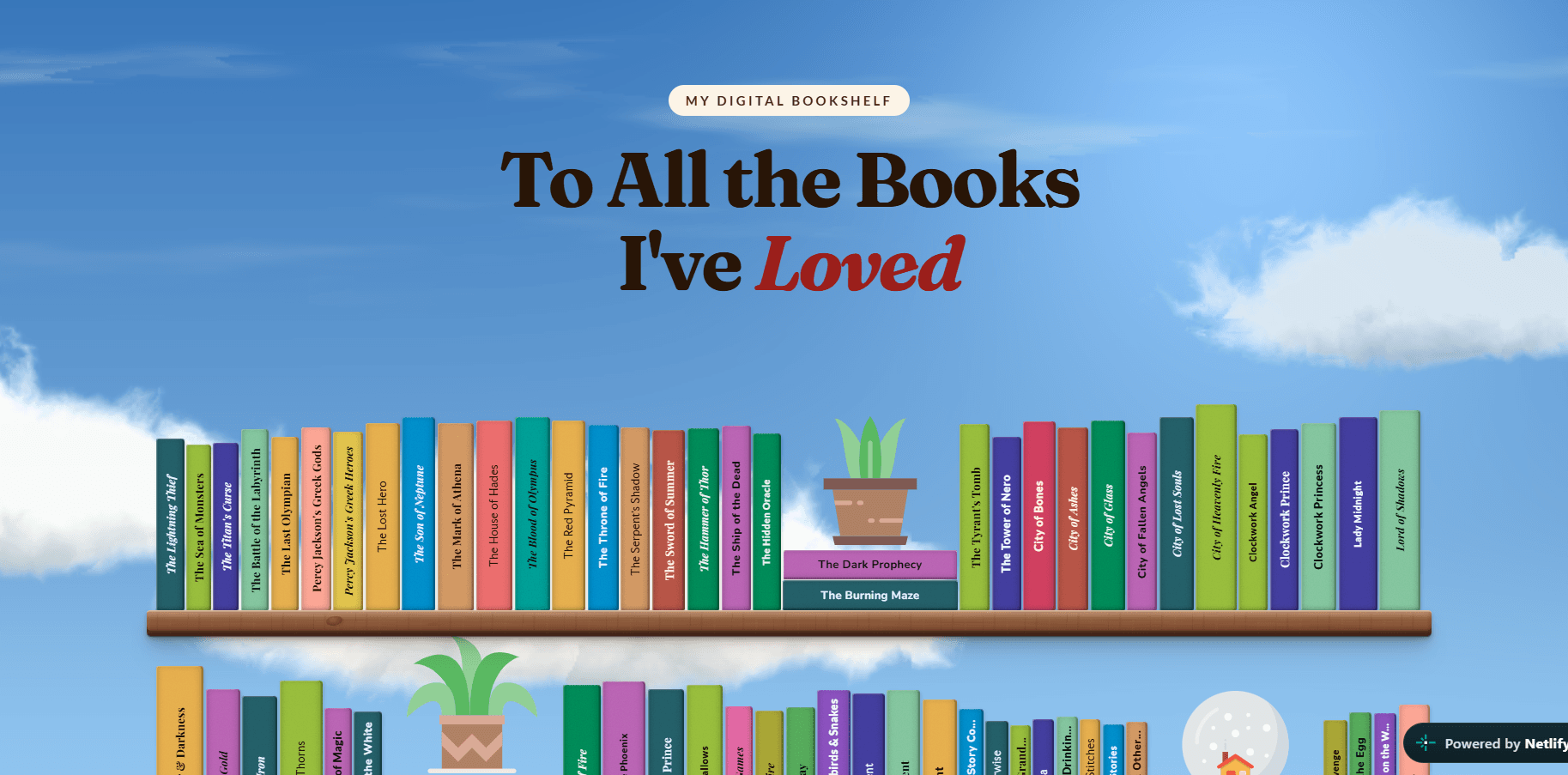
For a while now, i was bored of looking at marketing sites and dashboards and component libraries. So i was looking into building something fun. That’s when i came across https://axayagrawal.com/playground's project on pinterest and thought of building something similar.
I love reading and have been doing it for a long time but i had never documented it in any kind of way so I thought this would be great way to show it all.
Step 1 - Reserach
I started my research on Pinterest and was immidietly drawn to the illustrated bookshelf designs for their colourfulness and whimsy. My initial plan was to illustrate each book in procreate and add it to the shelf but that seemed like an extensive project which i will maybe try to do in future.
With our initial design reseacrh and reference gathering done, i moved to the next part.
Step 2 -Data gathering
I started with listing all the books i have read till date in a notion file. This took time and a little research and a lot of back an forth with sister to remember them all. After this I used gemini to create a json file of the books along with their authors, page count and genre.
i was inspired by Axay to use the page count as a way to determine the thickness of the book’s spine. Before that, i was hardcoding the width and height of the book spines to make the shelf look organic and fun.
The total came to be 169 books so far.
Step 3 - Build
I wanted the UI to look like a illustrated bookshelf with pots and plants without feeling rigid and boring. The books are aligned both vertically and horizontally with the title on the spine. The colors where asigned on random to the books with a slight grainy texture and shadow for realisim. I also added svg images of plants, globe and snow globe to the shelf to make it fun.
I played with the background alot. Initially i added a svg pattern background to make it appear like a wallpaper, then i tried using plain color with some shadows and some thing more. However i didnt like any of them.
I then came across a cloud shader by —— and i loved it. It added such a dreamy effect to the background.
I experimented with animating the books when hovering over them, but every version started to take away from the stillness of the illustration. I decided that not every element needed to move just because it could.
I used chatgpt and gemini for the initial research and claude code to build this entire project.
To keep it simple, the project is built using html, css and js and is hosted on netlify.
Potential Ideas
There are quite a few directions I could take this project in the future. The first would be adding a TBR shelf alongside the books I've already read, so the bookshelf becomes a reflection of both my reading history and what I want to read next.
I’d also like to make the collection more interactive — for example, being able to click on a book to see more details, filter the shelf by genre or author, and perhaps search through the collection.
Since I already have the book data, another interesting direction would be to turn some of it into visual reading statistics — pages read, favourite genres, books read each year, or how my reading habits have changed over time.
On the technical side, I’d like to eventually migrate the project to Next.js and experiment more with Motion for subtle interactions and transitions. I don't want to add animation just for the sake of movement, though. The goal would be to find interactions that make the bookshelf feel a little more alive while keeping the illustrated, quiet feeling of the original.
I had a lot of fun building and experimenting with this project and already planning many more. If this project inspires you to create something similar , I would love to see that.
View the projectAn illustrated digital bookshelf of every book I've read.(opens in a new tab)